The words “torrent” and “BitTorrent” are often associated with unauthorized file sharing, pirated media, and malware. That reputation comes from how the technology has sometimes been used, not from the protocol itself. BitTorrent is a peer-to-peer file distribution protocol. It can be used to share authorized software, public datasets, open-source operating systems, or copyrighted files uploaded without permission. Whether a transfer is legal depends on the content, the rights granted by its owner, and the applicable law. Several legitimate organizations publish torrent files because the system allows users to exchange pieces of the same file with one another. This can reduce demand on the publisher’s servers and provide another download option when large files are released to many users at once.
Real-World Use Cases: Official Torrent Distribution by Operating Systems, Software, and Data Repositories
Downloading Linux Operating System Installers (Ubuntu, Debian, Fedora)
Several Linux projects offer official torrent downloads for installation images. Ubuntu lists BitTorrent among its alternative download methods. Debian publishes torrents for installation and live images, while Fedora maintains an official torrent page for current releases. Arch Linux also provides torrent and magnet options for its installation image.
These ISO files are usually several gigabytes in size. During a major release, direct-download servers and mirrors may receive a sudden increase in traffic. Torrent distribution allows users who have already downloaded parts of the ISO to upload those pieces to others. This does not guarantee that a torrent will always be faster than a direct download. Performance depends on the number of active seeders, their upload capacity, network routing, client settings, and whether the user’s network restricts peer-to-peer connections.
Distributing Large-Scale Open-Source Software Suites (LibreOffice)
LibreOffice provides official torrent links for some of its downloadable packages, including desktop installers and source archives. These links are offered alongside regular mirrors rather than as the only distribution method. Torrent distribution can be useful when many people request the same release. Instead of requiring every user to retrieve the complete package from one mirror, peers can exchange verified pieces of the file.
The original claim that millions of users simultaneously download every major LibreOffice release cannot be confirmed from official public data and should not be presented as fact. The practical benefit is that torrents provide an additional distribution channel and can reduce part of the demand placed on project infrastructure.
Archiving and Preserving Cultural Datasets, Books, and Public Records (Internet Archive)
The Internet Archive creates torrent files for many eligible items in its collection. Depending on the item, a torrent may contain digitized books, audio recordings, video, software, or other archived material. However, not every Internet Archive file is available through BitTorrent. The organization also states that it does not necessarily seed every torrent itself. A download can only remain available when the swarm collectively contains all required pieces and at least one participant has a complete copy.
The earlier claim that the U.S. Library of Congress officially uses BitTorrent to distribute petabytes of records could not be verified through its official download services. That example should therefore be removed rather than presented as an established use case.
Game Updates and Large-Scale Data Transfers in Enterprise Environments
Peer-to-peer technology has been used for large software deployments, but current claims must be separated from historical examples. Twitter published an internal deployment tool called Murder in 2010. It used BitTorrent to distribute large software binaries across servers in the company’s data centers. This reduced the need to send a separate full copy from one central server to every destination machine.
Some game publishers have also used peer-assisted downloading in the past. However, there is not enough current official evidence to state that Blizzard Entertainment or Epic Games still use BitTorrent in their present launchers. Launcher architecture can change, and proprietary peer-to-peer systems should not automatically be described as standard BitTorrent.
Mitigating Bandwidth Overhead and Preventing Server Crashes on Launch Days
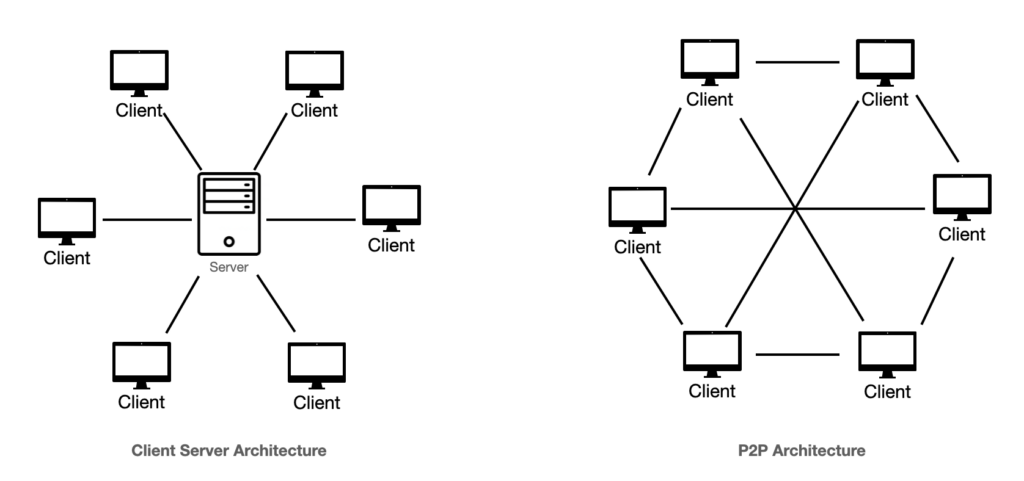
When a popular operating system or software release becomes available, a large number of users may attempt to download it within a short period. Smaller open-source projects may have limited server capacity, while larger organizations often rely on content delivery networks and geographically distributed mirrors.
BitTorrent provides another way to spread demand. Once users receive valid pieces of a file, they can upload those pieces to other users. The original source no longer needs to supply every byte of every copy. This reduces part of the publisher’s bandwidth burden, but it does not create “zero bandwidth cost.” The publisher still needs infrastructure to host the original files, distribute torrent metadata, operate websites, maintain trackers when used, and provide initial seeds or mirrors.
Swarm Dynamics: Higher Participation Equals Faster Download Speeds
The idea that a torrent automatically becomes faster whenever more users join is incomplete. A larger swarm is useful when additional participants can upload pieces that other users need. A swarm containing many downloaders with slow connections and only one weak seeder may still perform poorly. By contrast, a smaller swarm with several high-capacity seeders may deliver excellent speeds.
Torrent performance depends on the availability of complete pieces, peer upload limits, connection quality, firewalls, routing, client configuration, and network congestion. Higher participation can improve capacity, but it does not guarantee higher speed.
Preserving Download Availability Even During Central Server Outages
A torrent may remain downloadable when the project’s original mirror is unavailable. Users who already possess the torrent metadata can continue exchanging pieces through active peers. This resilience has limits. The swarm must collectively contain every piece of the file. Peer discovery must also remain possible through a tracker, distributed hash table, peer exchange, or previously known connections.
When no complete seed exists and certain pieces have disappeared from the swarm, the download cannot finish. BitTorrent reduces dependence on a single server, but it does not guarantee permanent availability.
How Torrent Technology Ensures Data Integrity and Prevents Malicious Tampering
BitTorrent includes automatic checks that detect corrupted or altered pieces during a transfer. These checks protect the consistency of the downloaded data, but they do not prove that an unknown torrent was created by the legitimate publisher.
Segmenting Large Files into Data Chunks
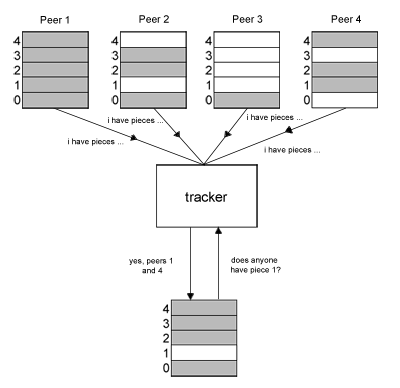
When a torrent is created, its files are divided into fixed-size sections commonly called pieces. A large ISO may be represented by hundreds or thousands of pieces. A client can request different pieces from several peers at the same time. After receiving them, it places each piece in the correct position and reconstructs the original file. The .torrent file contains information about the shared files, piece sizes, hashes, and peer-discovery methods. It does not normally contain the complete software installer, operating-system image, or dataset.
Cryptographic Hash Verification for Data Integrity
In BitTorrent version 1, torrent metadata contains SHA-1 hashes for file pieces. BitTorrent version 2 uses SHA-256 with a Merkle-tree structure. When a piece arrives, the client calculates its hash and compares the result with the value stored in the torrent metadata. A piece that does not match is rejected and downloaded again.
This process detects corruption and prevents a peer from silently substituting different data for a valid piece within that torrent. However, it does not authenticate the person who created the torrent. A malicious uploader can modify a file and generate new torrent metadata whose hashes match the modified version. Users must still obtain the torrent from an official source and verify separately published checksums or digital signatures when available.
Distinguishing Technology Neutrality from Risks of Unofficial Torrent Sources
The BitTorrent Protocol is a Fully Legal Data Distribution Technology
BitTorrent is a legitimate data distribution technology, but describing every use of it as legal would be inaccurate. The protocol itself is not prohibited merely because it can be used for copyright infringement. Linux developers, open-source projects, archives, researchers, and businesses can use it to distribute files they own or are authorized to share.
A particular transfer may still be unlawful when someone uploads or downloads copyrighted material without permission. The legal status depends on the file and the user’s rights, not simply on whether BitTorrent was used.
Key Differences Between Official Site Torrents and Unverified Online Files
Official Torrents: These are obtained from the verified website or repository of the project responsible for the release. They provide a stronger basis for trust, particularly when the project also publishes checksums or signed verification files.
An official source does not mean users should skip verification. Domains can be imitated, accounts can be compromised, and users may accidentally visit a look-alike website. The completed file should still be checked according to the publisher’s instructions.
Unverified Torrents (Third-Party Web Portals / Anonymous Indexers): These may have been uploaded by an unknown person. The file can be mislabeled, modified, bundled with unwanted software, or replaced with unrelated content.
A torrent client reporting that all pieces passed its internal hash check only proves that the download matches that torrent’s metadata. It does not prove that the file matches the developer’s genuine release.

Step-by-Step Guide: How to Safely and Correctly Download Official Torrents
Identifying and Obtaining Torrent Files or Magnet Links from Official Portals
To reduce the risk of downloading a modified file:
- Navigate to the project’s official website or verified repository.
- Check the domain carefully rather than relying only on the page design or an advertisement in search results.
- Open the Downloads, Alternative Downloads, or BitTorrent section.
- Download the provided .torrent file or open the project’s magnet link.
- After the download finishes, compare the completed file with the SHA-256 or other checksum published by the project.
When a signed checksum file is available, verify its digital signature before trusting the checksum. Ubuntu and Debian both publish official instructions for verifying downloaded installation images. The torrent’s info hash and the SHA-256 checksum of the completed ISO are different values serving different purposes. Users should not assume that the magnet link’s info hash is the same as the checksum published for the downloaded file.
Utilizing Reputable, Lightweight, and Open-Source Torrent Clients
Choose a client from its official website or a trusted operating-system repository.
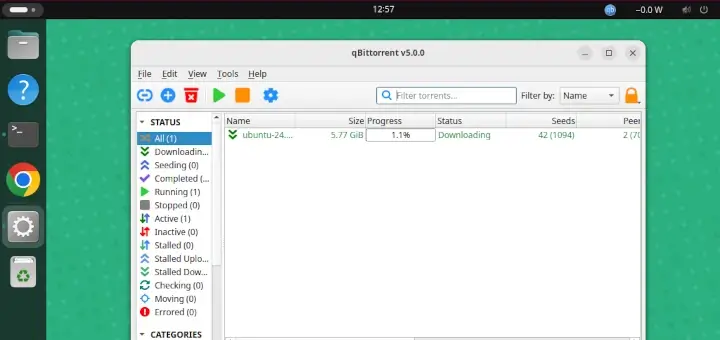
- qBittorrent: A free, open-source client available on Windows, macOS, Linux, and other supported systems. It does not rely on advertising in its official application.
- Transmission: A lightweight, open-source client available for major desktop platforms and commonly used on Linux systems.
- Deluge: A free, open-source, cross-platform client with plugin support and both desktop and server-oriented configurations.
Before starting, review the destination folder, selected files, bandwidth limits, and network settings. Avoid downloading torrent clients from repackaging websites that add installers, advertisements, or unrelated software.
The Seeding Culture: Supporting the Community After Download Completion
When the download reaches 100%, the client can continue uploading the complete file to other users. This is known as seeding. Seeding helps keep authorized open-source releases and public datasets available, but it is not mandatory. It also consumes upload bandwidth and may count toward a data cap.
Users should consider their network provider’s rules, workplace or school policies, privacy settings, and the legal status of the content before leaving a client active. Seeding is appropriate only when the file is authorized for redistribution.
BitTorrent is not limited to unauthorized entertainment files. Linux distributions, open-source software projects, the Internet Archive, and some enterprise engineering teams have used it as an official or authorized distribution method. Its advantages come from allowing participants to exchange file pieces, reducing part of the load on original servers and mirrors. Its hash system detects corrupted pieces, but it does not prove that an unknown torrent came from the legitimate publisher. The safer approach is to obtain the torrent directly from the project’s official website, use a trusted open-source client, and verify the completed file against the publisher’s checksum or digital signature. These steps allow users to benefit from peer-to-peer distribution without treating every torrent source as equally trustworthy.