When linking your bank account or investment portfolio with third-party financial applications, you are presented with an authorization screen requesting access permissions. Understanding the line between “viewing assets” and “making transactions” is vital to protecting your personal data and accumulated wealth. This distinction extends beyond user interface labels it reflects fundamental differences in technical infrastructure, API architecture, and risk exposure across the Open Finance ecosystem.
Open Finance Technical Infrastructure: Read-Only Scope vs. Write Access Scope
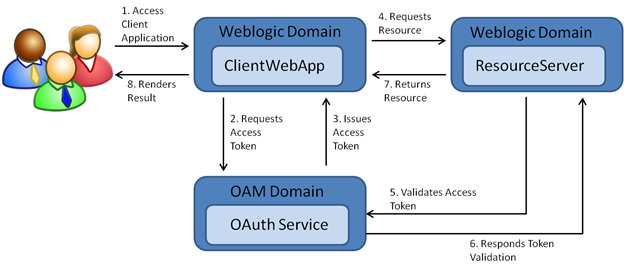
In modern Open Banking and Open Finance frameworks, data sharing is governed by Application Programming Interfaces (APIs) and the OAuth 2.0 authorization standard. When authenticating an app connection, your financial institution issues an access token with specific, bounded access scopes.
Viewing Assets (Read-Only Access / AISP)
Viewing permission grants the application the status of an Account Information Service Provider (AISP).
- Operational Mechanism: The issued access token contains strictly “Read” scope parameters. The application sends request payloads to the bank’s API endpoints solely to fetch raw financial data.
- Accessible Data: Account balances, investment portfolio holdings, historical transaction records, account holder name, and categorized spending history.
- Technical Barriers: Bank API servers hard-block any state-changing commands sent from the application. Any attempt by the app to alter data, initiate fund transfers, or place trades is rejected instantly at the server level.
Authorizing Transactions (Write Authority / PISP)
Transaction authority grants the app the status of a Payment Initiation Service Provider (PISP) or grants full Write/Execute permissions.
- Operational Mechanism: The access token carries “Write” or “Execute” scopes. The app can compose transaction orders and submit them directly into the financial institution’s core processing engine.
- Capabilities: Transferring funds between accounts, executing automated bill payments, sweeping spare change into savings, executing stock buy/sell orders, or rebalancing investment portfolios.
- Security Controls: This access level requires compliance with Strong Customer Authentication (SCA) mandates, enforcing two-factor authentication (2FA) or biometric verification during order setup.
Cybersecurity and Financial Risk Assessment
Each authorization tier provides distinct functional benefits while introducing a specific risk profile that requires careful evaluation prior to granting access.
Risks of View-Only Access: Data Privacy Exposure
While view-only access safeguards your funds against direct unauthorized transfers, significant privacy and security risks remain:
- Data Breaches: If the third-party app’s database suffers a breach, malicious actors can access your complete financial profile including net worth, income streams, and daily spending habits.
- Behavioral Profiling: Some free tracking applications collect transactional histories to aggregate and monetize consumer insights with marketing partners if their privacy policy lacks strict protections.
Risks of Transaction Authority: Direct Loss of Capital
Granting transaction authority opens a functional pathway for capital to exit your account. The risk severity increases under the following scenarios:
- Algorithmic Errors & Software Bugs: Automated micro-investing tools or portfolio rebalancing bots can experience code execution bugs, placing incorrect orders that trigger unintended transaction costs or trading losses.
- Account Hijacking: If an attacker compromises your account credentials on the third-party app, they can leverage established transaction privileges to transfer funds out to external accounts.
- Hidden Execution Costs: Automated execution services may incur spread costs or secondary transfer fees that diminish overall yields without explicit manual confirmation for each event.
Identifying Permission Labels on Authentication Screens
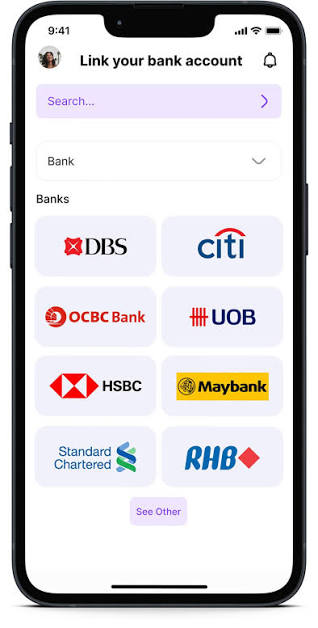
When connecting an app through data aggregators (such as Plaid, Yodlee, or MX) or directly via a bank’s OAuth screen, examine the phrasing used in the scope request list.
Read-Only Access Phrases
- “View account balances and transaction history”
- “Read-only access to financial data”
- “Account aggregation permission”
Transaction Authority Phrases
- “Initiate payments and fund transfers”
- “Execute trades and portfolio adjustments”
- “Full account access including bill payment”
Security Warning: Never infer permission scopes solely from an application’s marketing name. A budgeting tool may request payment initiation authority if it offers integrated bill pay or wallet top-ups. If an authorization screen displays vague terms like “Full Access” without itemizing permissions, reject the connection immediately.
Step-by-Step Access Control and Revocation Protocol
To maintain complete control over your linked financial ecosystem, implement this routine access management protocol:
- Evaluate Necessity: If your primary goal is tracking net worth or budgeting, reject any request that exceeds Read-Only permissions. If an app forces you to accept transaction rights for simple viewing functions, switch to an alternative tool.
- Isolate High-Risk Permissions: For apps requiring transaction rights (such as automated robo-advisors), link them to a secondary account with controlled balances. Avoid granting transaction authority on primary payroll or long-term savings accounts.
- Audit Connected Applications: Periodically log into your primary bank’s online platform, navigate to the “Security” or “Connected Applications” dashboard, and review all active third-party access tokens.
- Revoke Stale Tokens Immediately: Revoke access for any app you no longer use or no longer trust. Simply deleting the mobile application from your phone does not cancel the active OAuth token on the bank’s server; you must explicitly execute a “Disconnect” or “Revoke” command within your bank’s security settings.
Understanding the boundary between viewing assets and authorizing transactions is the foundation of digital financial security in the Open Finance era. While read-only access (AISP) provides valuable aggregation and insights with minimal exposure to direct fraud, transaction authority (PISP) grants third-party applications real control over your funds.